
Wi-Fi keeps Maryland clinics running. Electronic health records, telehealth sessions, and connected medical devices all rely on a stable signal. Yet more than 5,400 practices—from solo offices in Salisbury to busy outpatient centers in Baltimore—still rely on consumer routers and piecemeal upgrades. This guide compares six enterprise-grade options built for HIPAA compliance, 99.99 percent uptime, and dense device loads. Follow our rollout checklist and get a network that works as hard as your care team.
What Maryland clinics should look for in enterprise Wi-Fi
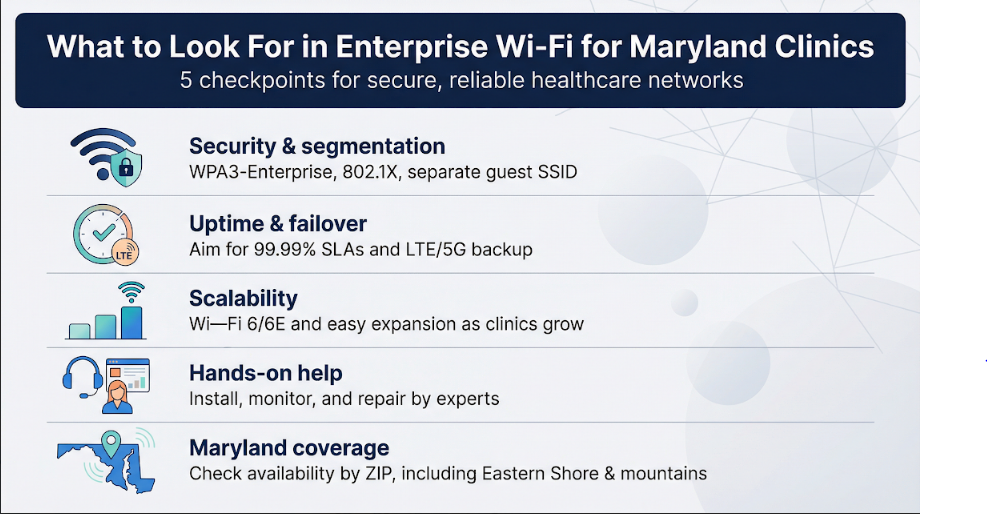
Before comparing providers, we need a yardstick. Clinic Wi-Fi sits under HIPAA scrutiny, powers life-critical apps, and must reach every exam room without a hiccup. Our criteria focus on security and reliability, then branch into growth and geographic fit.
First, encryption and segmentation. WPA3-Enterprise with 802.1X locks down ePHI, and a separate guest SSID keeps a waiting-room phone away from imaging files. HIPAA calls these steps “non-negotiable safeguards.”
Second, uptime. When the EMR freezes, appointments stall. Target service-level agreements near 99.99 percent and insist on a written failover plan such as LTE, 5G, or a second circuit to keep charting alive during an outage.
Third, scalability. Clinics evolve. Extra access points, Wi-Fi 6E support, and bandwidth tiers that upgrade without rewiring let you expand pain-free.
Fourth, hands-on help. Most practices lack network engineers. A provider that installs, monitors, and repairs gear overnight is worth the monthly fee.
Finally, Maryland reach. A fast service is useless if it stops at the county line. Verify coverage by ZIP, especially on the Eastern Shore and in the mountains where options thin out.
Keep these five checkpoints in mind; we’ll reference them for every solution that follows.
The best Wi-Fi solutions for Maryland clinics
We matched providers against the five checkpoints above and found six front-runners. We start with the most budget-friendly managed choice and finish with a fully custom build.
1. WOW! Business: Whole-Business WiFi (best budget-friendly managed option)
Hand the entire wireless job to a team that installs gear, patches firmware automatically, and answers the phone at 2 a.m. when a router blinks. That is the promise behind WOW!’s Whole-Business WiFi.
Keeping a clinic’s Wi-Fi budget in check rarely aligns with HIPAA-level protections, yet WOW!’s breakdown of affordable small business wifi solutions shows those goals can coexist. Building on that blueprint, Whole-Business WiFi bundles professional installation, network optimization, and 24/7 monitoring. The company calls this “enterprise-level performance without the enterprise price tag.” Clinics on tight margins get professional installation, mesh coverage, and 24/7 monitoring for less than a part-time IT salary.
Security arrives preconfigured. The eero mesh uses WPA3, updates itself overnight, and separates guest traffic from staff devices, covering our first checkpoint.
Performance fits small and midsize practices. Wi-Fi 6 radios juggle dozens of tablets, scanners, and wearables. If the building grows, extra nodes plug in and self-optimize without new cables.
Coverage is the one caution. WOW!’s network serves select metro corridors. Check your ZIP before you commit. If you fall inside the map, Whole-Business WiFi delivers secure, hands-off networking at a price a single-physician office can handle.
2. Comcast Business: Business WiFi Pro (best statewide coverage and one-stop security)
If you practice anywhere in Maryland, odds are Comcast coax or fiber already reaches your building. That footprint alone makes Business WiFi Pro a smart first quote for most clinics.
The package combines a Wi-Fi 6 gateway, cloud dashboard, and quick setup for private and guest SSIDs. Staff traffic rides its own VLAN while patient phones stay isolated, and you add access points only when you need wider coverage.
SecurityEdge filtering blocks suspicious domains automatically, and premium tiers include 4G LTE backup for power or line cuts. Your EHR session keeps moving even when a construction crew nicks the cable.
Speed should not hold you back. Cable plans deliver up to 1.2 Gbps downstream, while fiber sites scale to multigig symmetrical bandwidth—enough for imaging uploads and back-to-back telehealth calls.
Support rounds out the offer. Expect a 24/7 hotline, priority dispatch, and a local account representative who can tweak settings or overnight replacement gear. You will sign a multi-year contract, and pricing lands above basic options, but many practices pay the premium for one vendor that supplies bandwidth, Wi-Fi, and security under a single SLA.
3. Verizon Business: Fios with Secure Wi-Fi (best symmetrical speed for data-heavy clinics)
Some clinics move gigabytes of imaging and backup data every day. Verizon Fios excels here. Its fiber lines deliver nearly identical upload and download rates, reaching up to 940 Mbps in most Maryland metros, with multigig tiers arriving in newer builds.
Symmetry matters more than headline speed. When radiology pushes a large DICOM set to the cloud, uploads finish as fast as downloads, so staff do not wait on progress bars.
The business gateway ships with WPA3 encryption, multiple SSIDs, and VLAN tagging, letting you isolate guest traffic without extra hardware. For added resilience, add Verizon LTE failover. The router switches to cellular within seconds of a fiber cut, and your EHR session continues without interruption.
Support includes a 24/7 phone line and optional on-site technicians. Pricing often sits slightly below Comcast at comparable speeds, though Fios coverage thins outside the I-95 corridor. Check availability early. If Fios serves your address, it supplies speed, stability, and compliance-ready security in one package.
4. Astound Broadband: Business Internet (best personalized service in DC and Baltimore pockets)
Size is not everything. In Montgomery County and parts of Baltimore, Astound wins fans by acting like a neighborhood ISP with enterprise features.
Astound’s cable network delivers up to 1 Gbps downstream and business gateways that let you split staff and guest Wi-Fi with a few clicks. It lacks Comcast’s advanced dashboards, yet local support balances the feature gap. Call at noon and you will likely speak with a technician who already knows your building’s coax path.
Quotes often land 15 to 20 percent below the big two at the same speed tier, freeing budget for extra access points or a new tablet cart.
Coverage is the trade-off. Step outside the DC–Baltimore clusters and the modem option disappears. If your clinic sits inside that bubble, Astound offers solid bandwidth, human-scale support, and a monthly bill that finance will appreciate.
5. Managed MSP build: Aruba or Cisco Meraki (best custom, high-security deployment)
Sometimes an off-the-shelf bundle will not cut it. Multi-site groups, behavioral-health practices, and imaging centers with dozens of wireless devices often need the same hospital-grade network hospitals use. That is where a local managed service provider, or MSP, steps in.
The approach is direct. An MSP surveys your space, maps interference, then installs Wi-Fi 6E access points from Aruba, Meraki, or another enterprise vendor exactly where the signal is needed. Controllers enforce 802.1X authentication, role-based access, and tightly segmented VLANs, so staff tablets never mingle with guest phones or IoT pumps.
Because hardware stays on your premises, throughput remains high and latency predictable. More rooms? Add another AP and watch the cloud dashboard update in seconds. Need a forensic audit for a HIPAA review? Pull detailed logs that track every device hop, handshake, and byte.
Project costs typically start near $3,000 up front, with a monthly retainer for around-the-clock monitoring. In exchange, you gain hospital-level visibility, tailored support, and an upgrade path measured in configuration clicks, not construction projects. For clinics that view Wi-Fi as clinical infrastructure rather than office convenience, a managed MSP build is the top-tier choice.
Maryland connectivity and compliance considerations
Maryland ranks high for broadband access, yet gaps remain. City clinics enjoy dense fiber grids, while practices on the Eastern Shore still face limited backhaul. Map each location’s options rather than assuming statewide parity. A five-bar signal in Towson can drop to a single bar in Crisfield.
State regulation adds another layer. A 2025 privacy law extends safeguards to health-adjacent data that HIPAA does not cover. Any wellness-app feed moving through your Wi-Fi must remain encrypted and segmented. If a provider offers a HIPAA business associate agreement, confirm in writing that it also addresses the new state rules.
Telehealth grants help offset upgrade costs. Reviewers often ask how applicants will protect wireless traffic. A documented plan for WPA3, guest isolation, and automatic patching answers that question up front.
Physical factors matter, too. Historic brick walls attenuate 5 GHz signals, and summer storms can cut power long enough to corrupt an open chart note. Budget for a professional site survey, battery backups on every access point, and cellular failover for the main router.
Cyber-insurance questionnaires now demand specifics: Do you segment medical devices? Do you monitor guest traffic? A documented “yes,” supported by logs and policies, can lower premiums. Address these local and compliance nuances, and your Wi-Fi investment will pay dividends far beyond faster downloads.
Implementation tips for a secure clinic Wi-Fi
- Schedule a site walk. Invite the installer to trace every wall, lead-lined X-ray room, and tricky stairwell before mounting hardware. A 20-minute walkthrough can prevent weeks of “dead spot” tickets.
- Segment first, connect later. Create a private SSID for clinicians, another for medical devices, and a bandwidth-capped guest network. Label each clearly so staff do not guess where to log in.
- Lock down credentials. Replace factory passwords with long, unique passphrases, then store them in a password manager. If the hardware supports 802.1X, enable it and issue certificates to staff laptops.
- Enable automatic updates. Modern gateways patch firmware overnight. Turn this setting on and leave it. Unpatched Wi-Fi exploits remain a top breach vector.
- Test failover. Pull the primary cable after hours and confirm the router switches to LTE without dropping an active chart note. Better to find a mis-wired SIM slot on your schedule than during clinic hours.
- Document everything. Record SSID names, VLAN IDs, and support phone numbers in a single PDF. Store it where every provider and office manager can access it quickly.
Conclusion
Follow these steps and your new network will stay fast, compliant, and invisible—the way good infrastructure should be.
